A missing key was refused. A made-up key was not.
An API is the set of web addresses a site’s own pages call to fetch data. TravelVerify, a passport-checking service we made up for this lab, lets partner travel companies look up passport records through one. Each partner proves who it is with a partner key, sent in a header: a labelled line of extra information that travels with every request. This one is called X-Partner-Key.
We tested it the way an attacker would, changing one thing at a time. Leaving the key out was refused, which makes the check look like it works. It doesn’t. The server only checked that a key was there, not that it was a real one.
- No partner keyRefused
- A random key added to the web address insteadRefused
- A real partner keyAllowed, as it should be
- A made-up partner keyAllowed: the full passport record came back
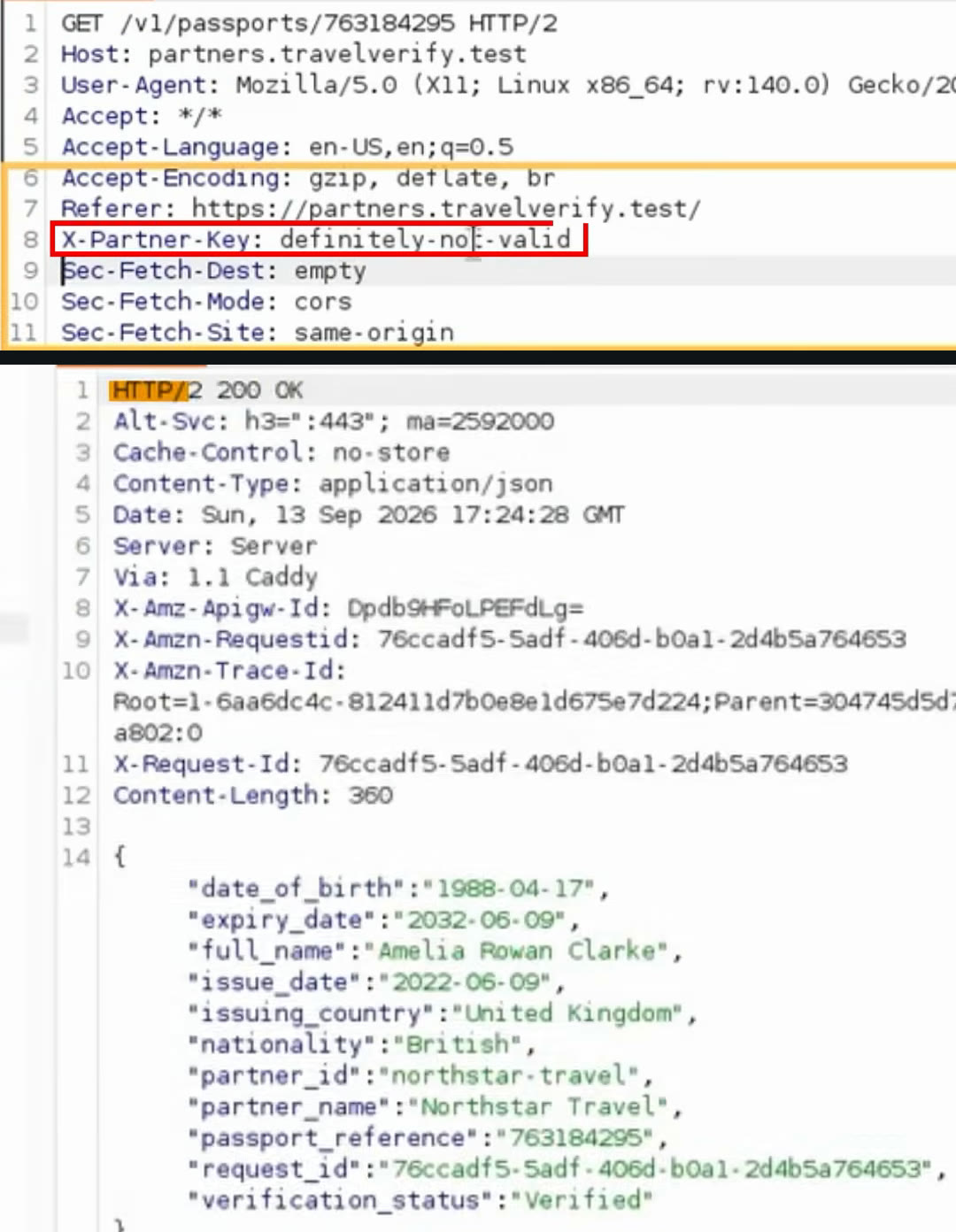
- A key nobody issuedThe request carries X-Partner-Key: definitely-not-valid. No partner was ever given that key.
- 200 OKThe server accepted it. After the fix, the same request is refused with 403 Forbidden.
- A full passport recordName, date of birth, nationality, issuing country, expiry date and passport reference. All made up for the lab, but this is the shape of what a real service holds.
How we found the passport address
You can’t test an API until you know its address. This one was given away by a file the developers had left on the live site: a source map, the “debugging map” in the video.
Websites squash their JavaScript code before publishing it, so it loads fast. The squashed version is very hard to read. A source map is a helper file that links it back to the original, readable code, so developers can fix bugs. It belongs on a developer’s machine. Left on the live site, it hands the readable code to anyone who downloads it.
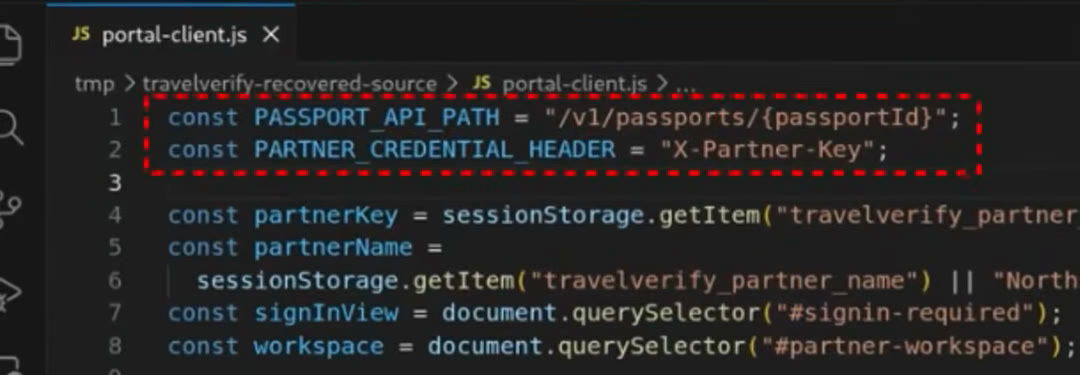
- Rebuilt from the mapportal-client.js, recovered from the source map. None of this was meant to be readable from outside.
- The passport address/v1/passports/ followed by a passport reference. Now we know where passport records come from.
- The key’s nameX-Partner-Key is the header the server checks. Now we know what to test.
Two checks that would have caught it before release
Both mistakes can be found automatically, every time developers ship a change. The video names two free, open-source tools for it.
Trivy reads infrastructure code, the files that describe how cloud services are set up, and flags risky settings. Here the passport address in Amazon API Gateway, the AWS service that receives the requests, was set to Authorization NONE. That meant the gateway never asked the authorizer, a small program that checks each key against the real partners, to vet the caller. In our lab, a Trivy check in the release pipeline blocked that version.
Sourcemapper looks for a source map behind a site’s JavaScript and tries to rebuild the code from it. If it can, so can an attacker. In our pipeline it found the map and stopped the release.
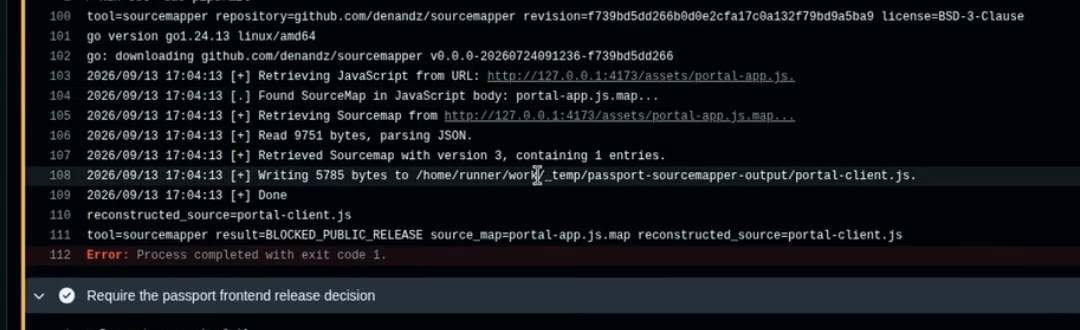
- Map foundSourcemapper finds portal-app.js.map behind the site’s JavaScript and rebuilds portal-client.js from it.
- Release blockedThe step reports BLOCKED_PUBLIC_RELEASE and fails, so this version never goes live.
The fix itself is small. Switch the gateway over to the authorizer, so every key is checked against the real partners. Then make the app check that the record asked for belongs to the partner asking. Our deep dive found that second gap too: a real key from one travel company could read another company’s customer.
- No partner keyRefused (401)
- A made-up partner keyRefused (403)
- A real key asking for another company’s recordRefused (403)
- A real key asking for its own recordAllowed (200)
aws apigateway get-method \ --rest-api-id <api-id> \ --resource-id <resource-id> \ --http-method GET \ --query "{authorizationType:authorizationType,authorizerId:authorizerId}"Check your own API
- Open your site in Chrome, press F12 and look in the Sources tab for files ending in .map. If you can open one and read your own code, so can anyone.
- Send one request to your own API with a made-up key. Anything other than a refusal needs fixing today.
- Send a real key asking for a record that belongs to someone else. That should be refused too.
- In AWS, check that no private API Gateway method has Authorization set to NONE.
- Add Trivy and a source-map check to the pipeline that ships your code, so the next slip is stopped before release.
Only test systems you own, or have written permission to test.
What we check on a real API test
The short shows the headline. These are the steps behind it, in the order we take them.
- Map what the site gives away
Source maps, JavaScript files and the browser’s own network traffic usually name every API address and header the app uses.
- Change one thing per request
No key, a made-up key, a real key, then a real key asking for someone else’s record. Each answer decides the next test.
- Read the setting behind it
The gateway’s own configuration shows whether a check is attached at all. The command above reads it without changing anything.
- Look back through the logs
API Gateway access logs can show passport requests that succeeded with no verified partner. AWS GuardDuty won’t spot this for you: it can’t tell whether a custom key is valid.
What this doesn’t prove
Rebuilt and tested in our private AWS lab, September 2026.
- TravelVerify, its partners and every passport record here are made up. Everything ran in our private AWS lab. Two made-up records were enough to prove the problem, and no real person’s data was involved.
- The “thousands of people” in the video is what a live service with this mistake could expose. It is not a count from our lab.
- Rebuilding a mistake in a lab shows how it works. It doesn’t tell you any real company has it.
- Logs only cover what they kept. Finding nothing in three months of logs means nothing turned up in those three months, not that it never happened.
Sources
- The AWS Passport API That Accepted Any Non-Empty KeyInvicta Group Cyber (our lab write-up)
- API2:2023 Broken AuthenticationOWASP, read 13 Nov 2026
- API1:2023 Broken Object Level AuthorizationOWASP, read 13 Nov 2026
- Use API Gateway Lambda authorizersAWS, read 13 Nov 2026
- GuardDuty foundational data sourcesAWS, read 13 Nov 2026
- Source mapMDN Web Docs, read 13 Nov 2026
- TrivyAqua Security, read 13 Nov 2026
- sourcemapperdenandz on GitHub, read 13 Nov 2026