Why the name can lie
A file’s extension is the last part of its name, after the final dot. It tells Windows what kind of file it is: “.pdf” is a document, and “.exe” is a program, which runs when you open it. [8]
Windows hides the extension of most files by default. [1] [5] It did on our test machine from the start, so a program called Invoice.pdf.exe showed up as Invoice.pdf. The icon doesn’t help either: all our test programs showed a PDF icon. [9]
Attackers use this trick. MITRE ATT&CK, the public catalogue of attacker techniques, calls it a double file extension, with real cases such as a program named PreviewReport.DOC.exe. [1] Shortcuts work too. Palo Alto Networks’ Unit 42 counted 68,392 malicious shortcut files in 2024, up from 21,098 in 2023, and one of its examples was called 2023_Annual_Report.pdf.lnk. [4]
The three rounds from the video
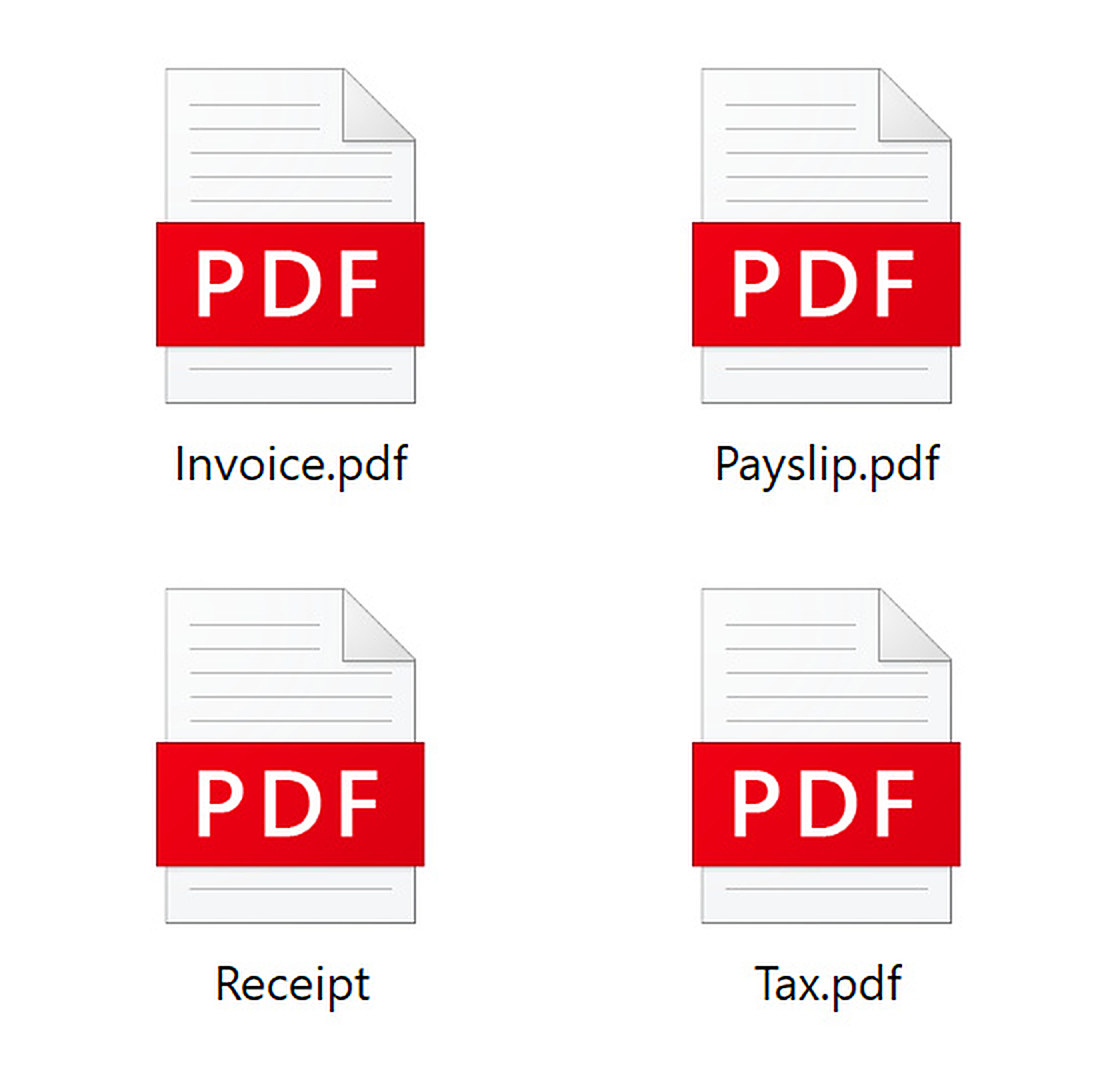
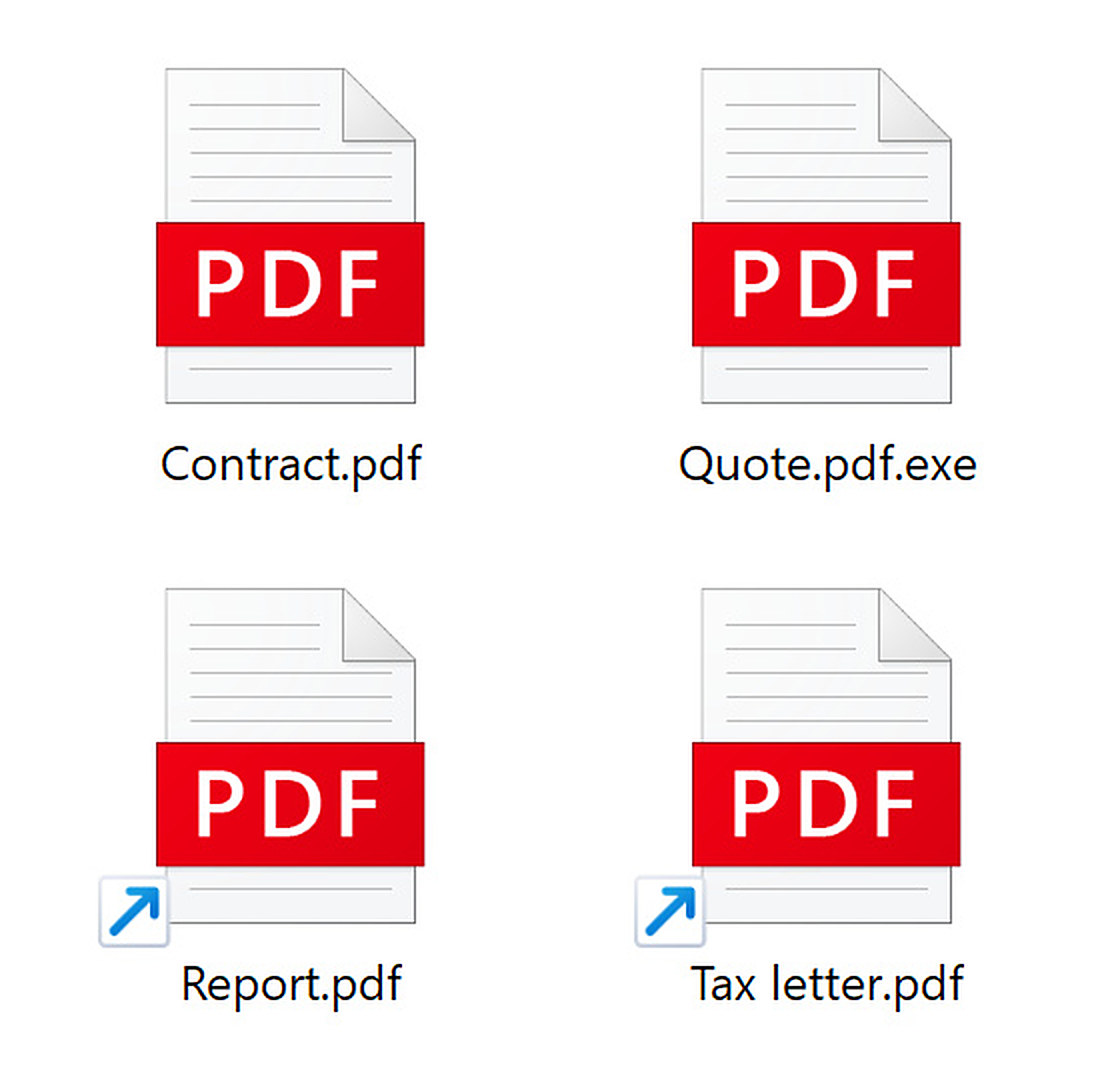
These are the real File Explorer screens from our test machine. Each round has one real PDF. [9]
Extensions hidden, the Windows default
Three of these say PDF, and all three are programs. Their names really end in .exe, which Windows hides. The real PDF is Receipt, the only one whose name doesn’t say PDF, because Windows hid its .pdf as well.
Extensions showing
With extensions turned on, Quote.pdf.exe gives itself away. Report.pdf and Tax letter.pdf are shortcuts wearing a PDF icon, and a shortcut can run a program. With its default shortcut settings, File Explorer still hides a shortcut’s own extension, .lnk, even with File name extensions on, so look for the little arrow on the icon. The real PDF is Contract.pdf.
The flipped name
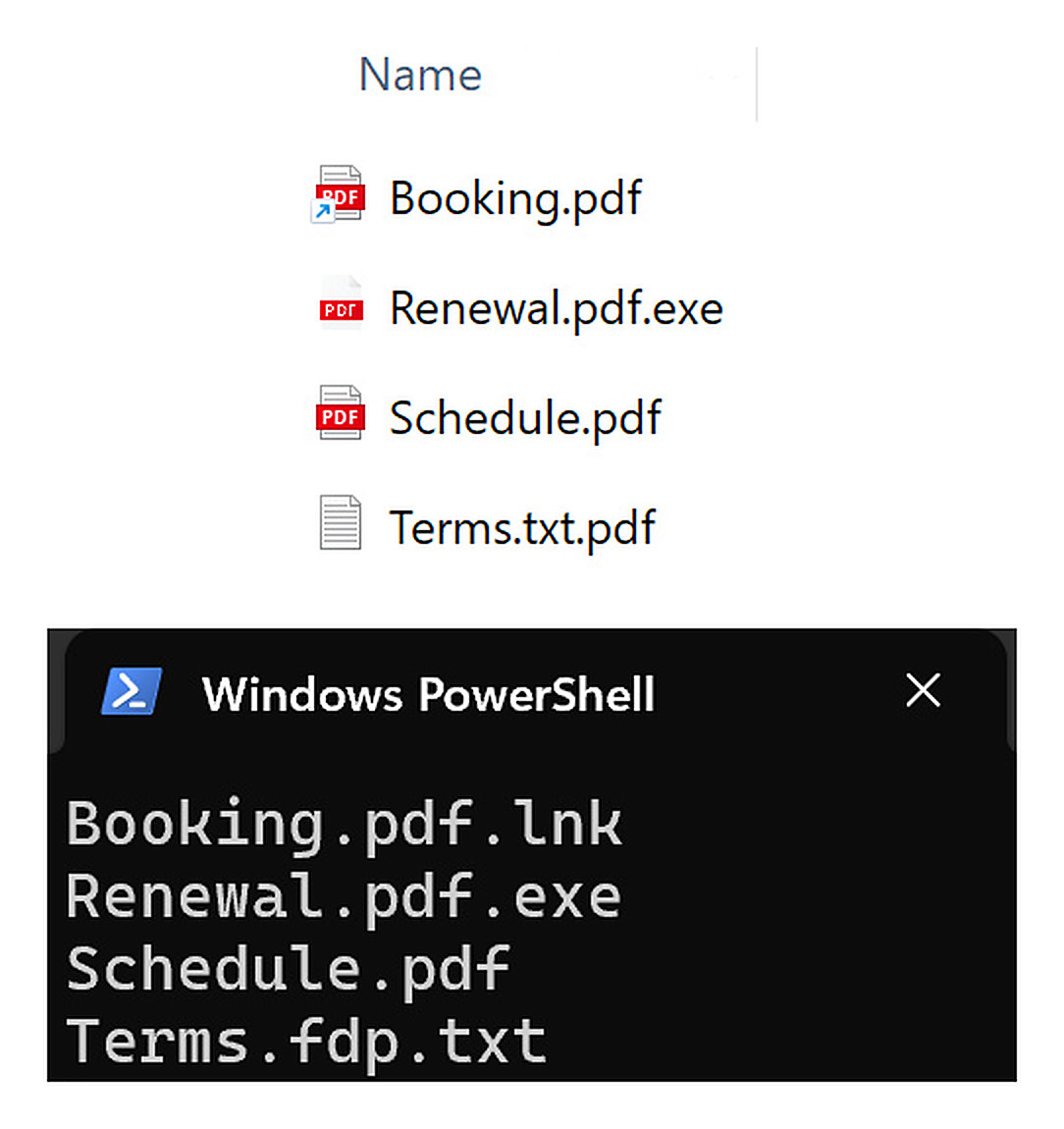
Extensions on. Renewal.pdf.exe is a program and Booking.pdf has the shortcut arrow. Terms.txt.pdf looks like a PDF, but our PowerShell listing shows the stored letter order: Terms.fdp.txt, a text file. The real PDF is Schedule.pdf.
One invisible character turns the name round
Round three uses a character you can’t see, the right-to-left override. In Unicode, the standard list of every character computers use, it is U+202E. It was made for languages written right to left, such as Arabic and Hebrew, and everything after it is shown backwards. [6] [7]
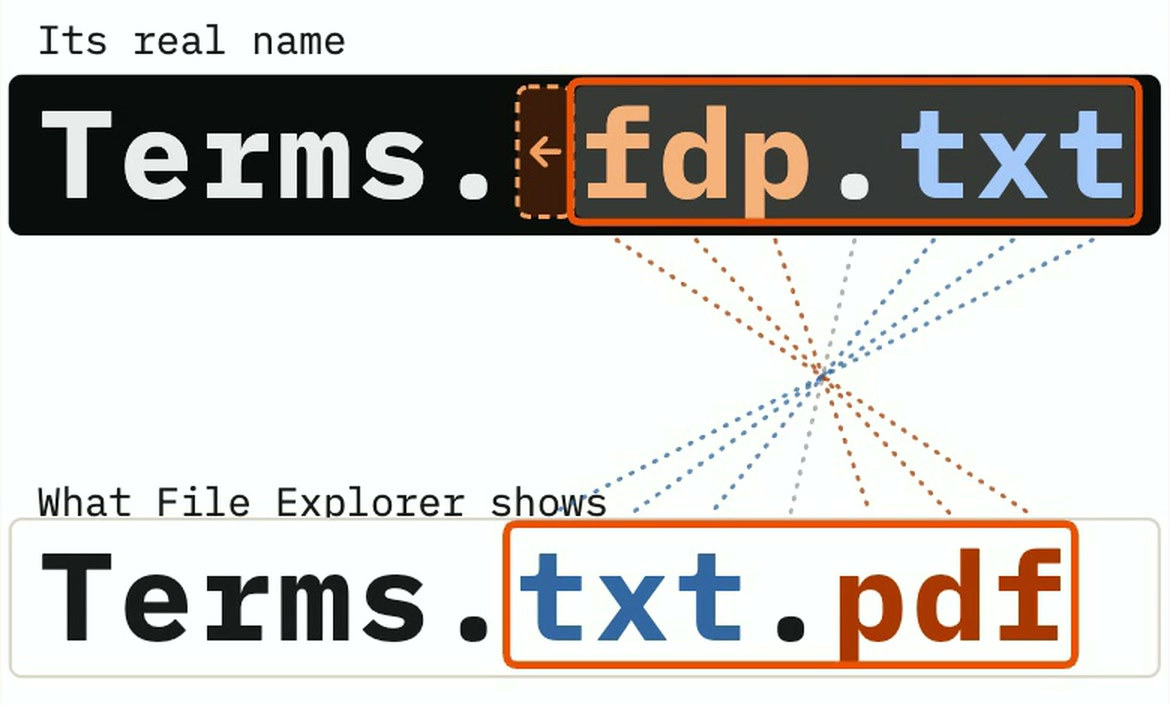
Ours was only a text file, with three lines of ordinary terms in it. [9] Attackers do the same with programs. MITRE’s example is a screensaver program named “March 25”, the hidden character, then “xcod.scr”, which displays as “March 25 rcs.docx”. It lists groups such as BlackTech, BRONZE BUTLER and Ke3chang using the trick. [2]
On 9 November 2026 we tried it with a test program too, named so that with extensions showing it would read Agreement annexe.pdf. Windows Security quarantined it as Trojan:Win32/Artoelo.B, rated Severe. Five copies of the same program with a plain .pdf.exe name weren’t flagged, so the hidden character seems to be what it objected to. That is one test on one machine, so don’t count on it. [9]
The column that told the truth
Turning on extensions only catches round one. A shortcut keeps its .lnk hidden, and a flipped name still ends in .pdf on screen. One place told the truth in all three rounds: the Type column in File Explorer’s Details view. It goes by the real extension, whatever the name looks like. [4] [5] [9]
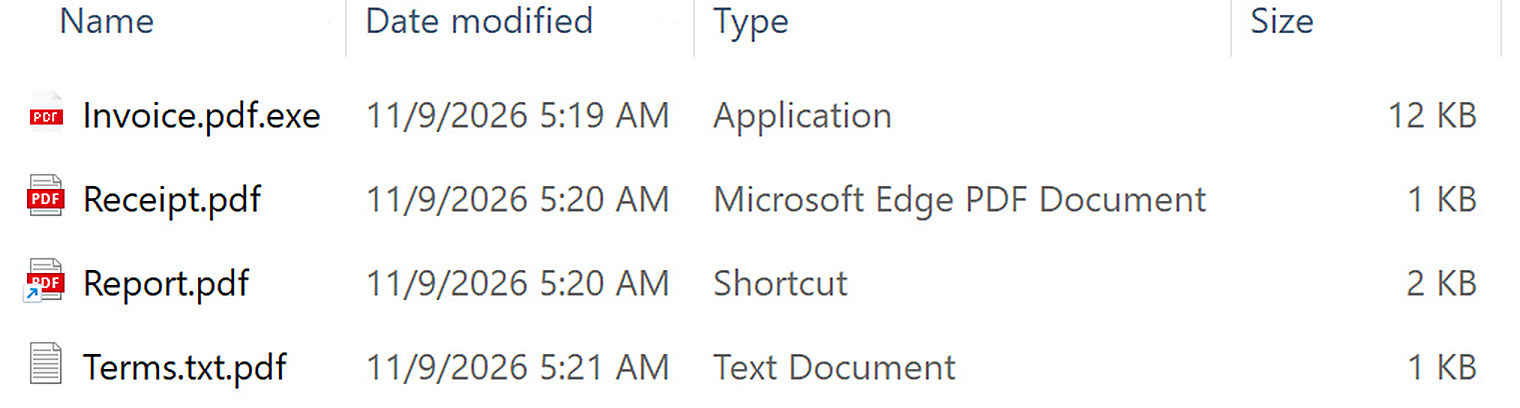
- A programApplication means it runs when you open it.
- The real PDFThe wording depends on the PDF reader the PC uses.
- A shortcutThe name says PDF. The type doesn’t.
- The flipped nameTerms.txt.pdf is really a text file.
- Program, Invoice.pdf.exeHidden: Invoice.pdf. Extensions on: Invoice.pdf.exe. Type: Application
- Shortcut, Report.pdf.lnkExtensions on: still Report.pdf. Type: Shortcut
- Text file with the hidden characterHidden: Terms.pdf. Extensions on: Terms.txt.pdf. Type: Text Document
- Real PDF, Receipt.pdfType: Microsoft Edge PDF Document
Check your own PC
- Open File Explorer, click View, then Show at the bottom, and tick File name extensions. On Windows 10 the tick box is on the View tab.
- That only catches round one. So also click View, pick Details, and read the Type column.
- If you’re expecting a PDF and the Type column says Application, Shortcut or anything else odd, don’t open it.
- Look for the small arrow on a file’s icon. It means a shortcut, whatever the name says.
A real PDF can still be dangerous, so the Type column isn’t a guarantee of safety. If you weren’t expecting a file, don’t open it.
Where we look on a work machine
Someone says they opened a PDF and nothing seemed to happen. These are the first places we check.
- Read the real names
File Explorer hides some extensions and can display a flipped name. On our test machine, the PowerShell listing showed the stored letter order: Booking.pdf.lnk and Terms.fdp.txt where File Explorer showed Booking.pdf and Terms.txt.pdf. Other terminals may render bidirectional text differently, so check the stored characters as well as the display.
- What they started
UserAssist counts the programs and shortcuts a user started from the desktop or File Explorer, with the last time each one ran. Shortcuts have a list of their own.
UserAssist - Which files they opened
RecentDocs keeps the names of files a user opened, grouped by extension. A “PDF” filed under .txt or another type is worth a closer look.
RecentDocs - Where it came from
If it arrived by email, Outlook keeps copies of attachments a user opened in a hidden folder, even after the email is deleted.
Outlook attachment folder - What ran next
A file double-clicked in File Explorer is started by explorer.exe. A shortcut can point at a built-in tool such as PowerShell or cmd and hand it a command, so check what explorer.exe started, and with what command line.
Abused built-in tools
What this doesn’t prove
Tested on a Windows 11 test machine, 9 and 10 Nov 2026.
- One Windows 11 test machine (25H2, build 26200), tested on 9 and 10 Nov 2026. Other versions and settings may look different. [9]
- Windows Security quarantined our flipped-name program but not our plain .pdf.exe copies. That is one test, and says nothing about how often it catches real malware. [9]
- The flipped name on screen is a text file. The program version was quarantined before we could film it. [9]
- On a PC with another PDF reader, a real PDF’s Type may read Adobe Acrobat Document instead.
- The Type column tells you what kind of file it is, not whether it’s safe. A real PDF can still be dangerous.
Go deeper on our wiki
Sources
- Masquerading: Double File Extension (T1036.007)MITRE ATT&CK
- Masquerading: Right-to-Left Override (T1036.002)MITRE ATT&CK
- Obfuscated Files or Information: LNK Icon Smuggling (T1027.012)MITRE ATT&CK
- Windows Shortcut (LNK) Malware StrategiesPalo Alto Networks Unit 42, 2 Jul 2025
- Lesser known tricks of spoofing extensionsMalwarebytes, 30 Sep 2016
- Unicode Bidirectional Algorithm (UAX #9)Unicode Consortium
- “Right-to-Left Override” Aids Email AttacksKrebs on Security, 26 Sep 2011
- Common file name extensions in WindowsMicrosoft Support
- File Explorer, PowerShell and Windows Security captures and test recordOur Windows 11 test machine, 9 and 10 Nov 2026